How to make your intranet better (and actually worth logging into)
Let’s call it what it is.
Most intranets feel like a dusty file cabinet someone dragged onto the internet in 2006 and never touched again. They’re cluttered. They’re confusing. They’re filled with PDFs named Final_v3_Updated_REAL_FINAL.pdf. And yet… your intranet should be one of the most important digital spaces your organization owns.
It’s where culture shows up (or doesn’t). It’s where processes either move smoothly or grind to a halt. It’s where employees decide — quietly and subconsciously — whether internal communication feels energizing or exhausting.
That’s not a small thing.
Your intranet isn’t just a place to “put stuff.” It should be built to a daily use standard (i.e., what will make it interesting and useful for people to use every day, in a way that’s still manageable with the available time you have to dedicate to it. It shapes how work gets done, how people connect, and how aligned your organization feels behind the scenes.
At Juicebox, we believe your intranet deserves the same intentional design thinking as your public website — maybe even more. It should reduce friction. Reinforce culture. Streamline workflows. Support governance. Connect partners. And yes, it should look and feel like something people actually want to use. If you’re ready to rethink yours, here’s where to start.
Start with friction, not features
When organizations redesign an intranet, they often begin with navigation structures and page counts. That’s backward. The first conversation should be about friction.
- Where is work harder than it needs to be?
- Where are people duplicating effort?
- Where are employees emailing someone simply because they can’t find what they need?
An intranet is fundamentally a productivity tool. If it’s not making work easier, it’s not doing its job. When we start intranet projects, we talk to real users. We ask what frustrates them. What takes too long. What feels clunky. Those answers shape architecture far more effectively than a theoretical sitemap ever could. Design around real problems, and adoption follows naturally.
Use it to reinforce culture (not just house policies)
An intranet isn’t just operational infrastructure — it’s cultural infrastructure. Culture is reinforced by what gets highlighted, celebrated, and made visible. Your intranet gives you a built-in stage for doing exactly that.
Celebrate birthdays automatically
Adding a birthdate field to your staff directory allows your homepage to automatically display upcoming birthdays. Once the data is entered, the system handles the rest. No HR spreadsheets. No monthly reminders. No manual upkeep. It’s a small feature that keeps the site feeling alive and encourages connection in simple, sustainable ways.
Recognize work anniversaries
Work anniversaries are another easy but powerful addition. Highlighting milestones — every year of contributions and also milestones of five or ten years — reinforces appreciation and continuity. It sends a quiet signal that contribution matters. Over time, those signals compound.
Create a peer-driven kudo board
A kudo board allows employees to nominate coworkers who’ve gone above and beyond. We typically build this with a nomination form that creates a draft entry, notifies an administrator, and publishes upon approval. The result? A self-sustaining recognition engine. When appreciation becomes visible and easy, positive behavior scales. Your intranet becomes a culture amplifier.
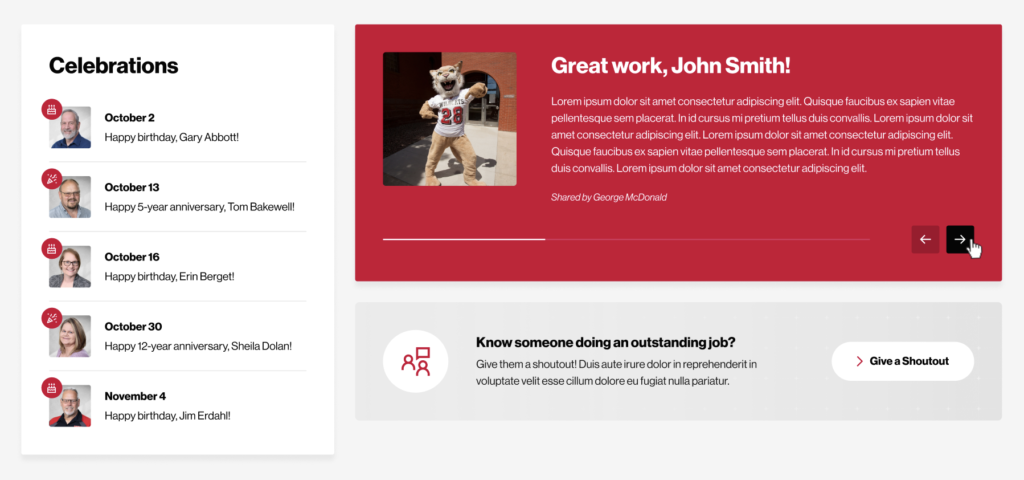
North Dakota State College of Science celebrations and kudos.
Fix broken processes while you’re there
An intranet refresh is the perfect opportunity to eliminate inefficient workflows. If your internal processes still involve downloading a PDF, printing it, scanning it, emailing it, and manually re-entering data somewhere else — that’s not a workflow. That’s friction disguised as tradition.
Modern intranets can:
- Route forms automatically
- Trigger approval notifications
- Store submissions in searchable dashboards
- Generate real-time reporting
When processes are streamlined, employees feel it immediately. Work becomes lighter. Faster. Less fragmented. If you’re overseeing the project, you should expect to meet with each department to give them guidance on processes they can transition to be web-based and paperless.
An effective intranet reduces internal drag.
AI-powered search and knowledge discovery
Search is often the weakest point of traditional intranets. A modern intranet should move beyond basic keyword matching and consider AI-enhanced search capabilities that:
- Weight critical policies higher
- Interpret conversational queries
- Surfacerelated resources
- Suggest relevant content
When someone types, “How do I request parental leave?” the system should understand intent — not just match keywords. AI-driven search dramatically improves usability and builds trust in the platform.
Build a Resource Library that actually functions like one
A page filled with links is not a resource library.
A true resource library allows users to filter by topic or department, search within the collection, preview content, and sort by content type. Resources might include training videos, policy pages, templates, toolkits, archived webinars, or even internal podcasts.
But the real magic? Structured centralization. When we built a faculty-focused resource library for Community College of Vermont—serving more than 12,000 students—we didn’t create a dumping ground for documents. We built a living, searchable ecosystem designed specifically for instructors, faculty, and staff.
What that looks like in practice
Inside the library, faculty can:
- Filter by department, topic, or initiative
- Sort by content type (video, document, toolkit, policy page, webinar, podcast, etc.)
- Preview summaries before committing time
- Search within the collection to pinpoint exactly what they need
And importantly, they can provide immediate feedback on whether a resource was helpful. That built-in feedback loop does two powerful things:
- It allows faculty to quickly see which resources others have found most helpful — saving time and increasing confidence in what they choose to use.
- It gives administrators insight into what’s resonating, what needs improvement, and where new resources may be needed.
Over time, the library becomes self-refining. The most useful content rises to the top. The less helpful content gets improved or retired.
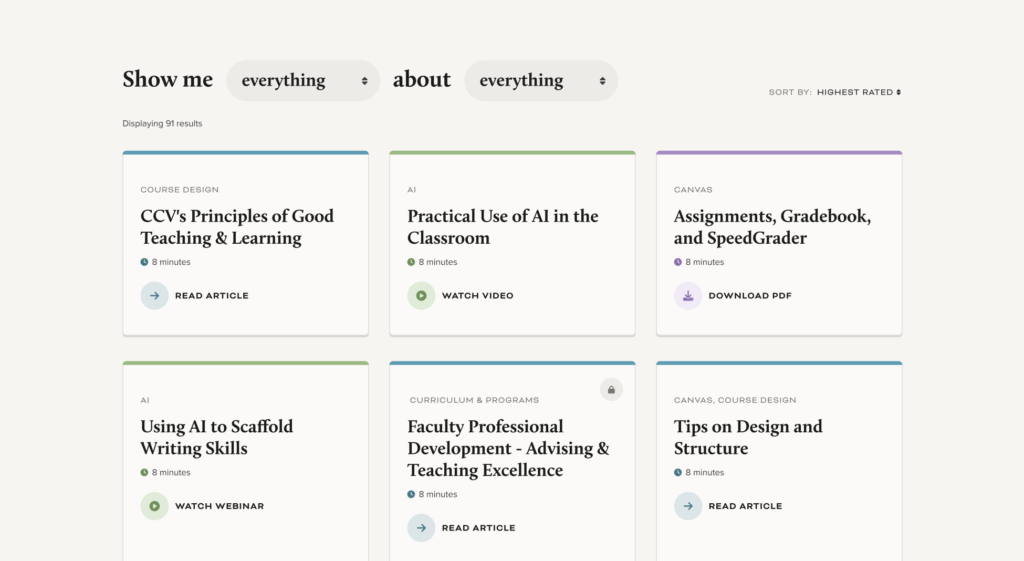
Community College of Vermont resource library.
Centralized — without being rigid
Everything lives in one organized system. That’s the backbone. But departments can surface relevant resources dynamically on their own pages using flexible content blocks. That balance keeps the structure clean while preserving autonomy. No duplication. No outdated PDFs hiding in forgotten folders. No “Final_v3_REAL_THIS_ONE.pdf” chaos.
More than just files
The library also serves as a faculty pulse hub — a place to stay current on:
- Academic policy updates
- Teaching best practices
- Professional development opportunities
- Campus-wide initiatives relevant to instructors
Instead of scattered emails and disconnected microsites, faculty get one intuitive place to search, discover, and contribute. Because a real resource library isn’t a static archive. It’s a knowledge engine — one that gets smarter every time someone uses it.
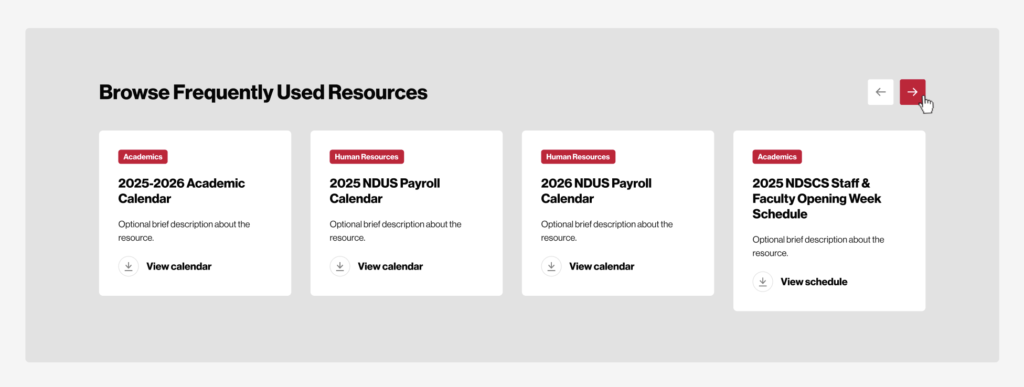
North Dakota State College of Science featured resources.
You’re building a board intranet, think beyond governance
Board portals often focus exclusively on meeting materials, financial reports, and agendas. All necessary.
But there’s an opportunity to go further. Board members frequently serve alongside one another for years without fully understanding each other’s professional backgrounds, philanthropic involvement, or areas of expertise. A board intranet can change that.
Including comprehensive board member bios, professional highlights, committee participation, and years of service helps foster familiarity and collaboration. When board members understand who they’re serving, conversations become more informed, and relationships grow stronger.
A board portal shouldn’t just manage governance. It should support relationships.
Board portal example: elevating the experience
For the Blanton Museum of Art, we built digital tools that support both public engagement and internal leadership experience. Within their board-facing systems, we emphasized clear organization of governance materials, intuitive access to documents, and thoughtfully presented board member biographies. The goal wasn’t just compliance — it was experience.
Board members are leaders in their communities. Providing them with a polished, structured portal communicates that their time and service are valued. When internal systems reflect the same level of excellence as the public-facing brand, alignment happens. And alignment builds confidence.
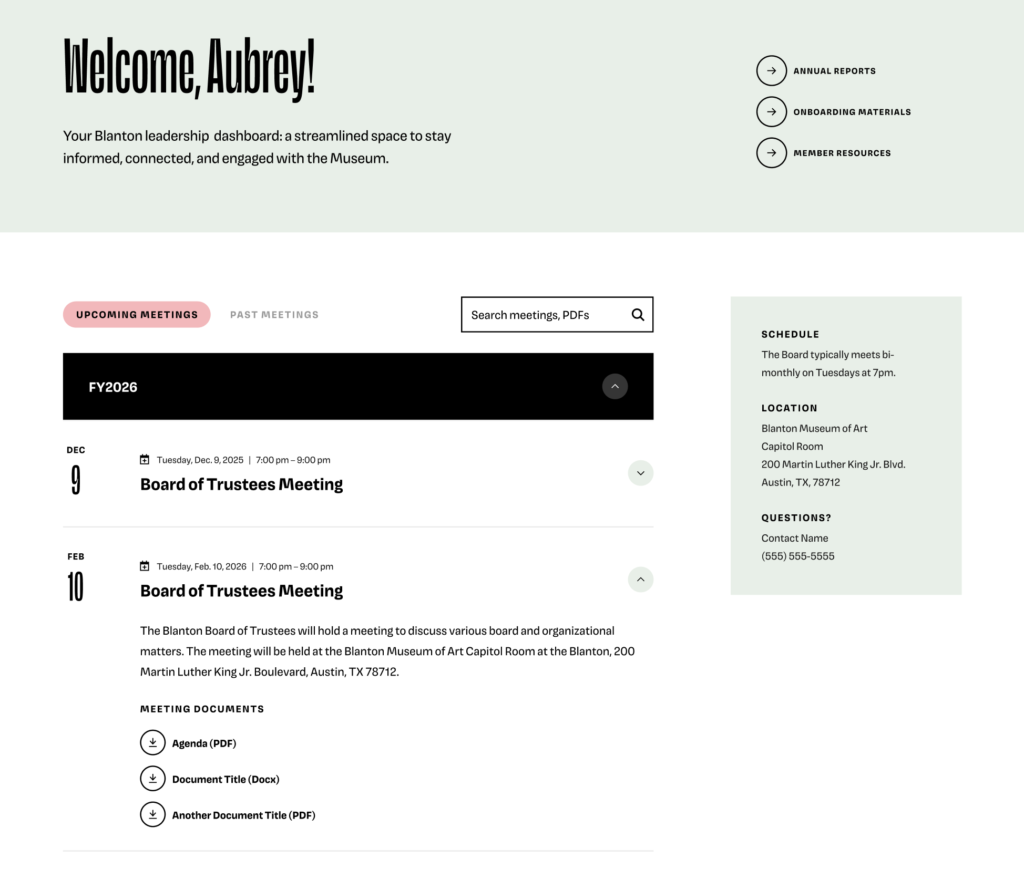
Blanton Museum of Art board portal.
Intranets: strengthening affiliate networks
Not every intranet is purely internal. Some of the most impactful intranets connect entire networks of affiliates or partners.
A partner intranet can serve as the central hub for:
- Upcoming training and events
- Archived webinars and video resources
- Documentation and procedural guides
- Current and historical reports
- Collaborative updates
Des Moines Area Religious Council (DMARC)
For DMARC, we created a partner-facing platform that supports their network of affiliated food pantries. Affiliates can log in to access the latest training materials, event information, documentation, and reporting tools — all organized in a clear, structured environment.
Instead of fragmented email chains and scattered files, there’s one centralized location for critical information. That structure strengthens collaboration and improves consistency across the network.
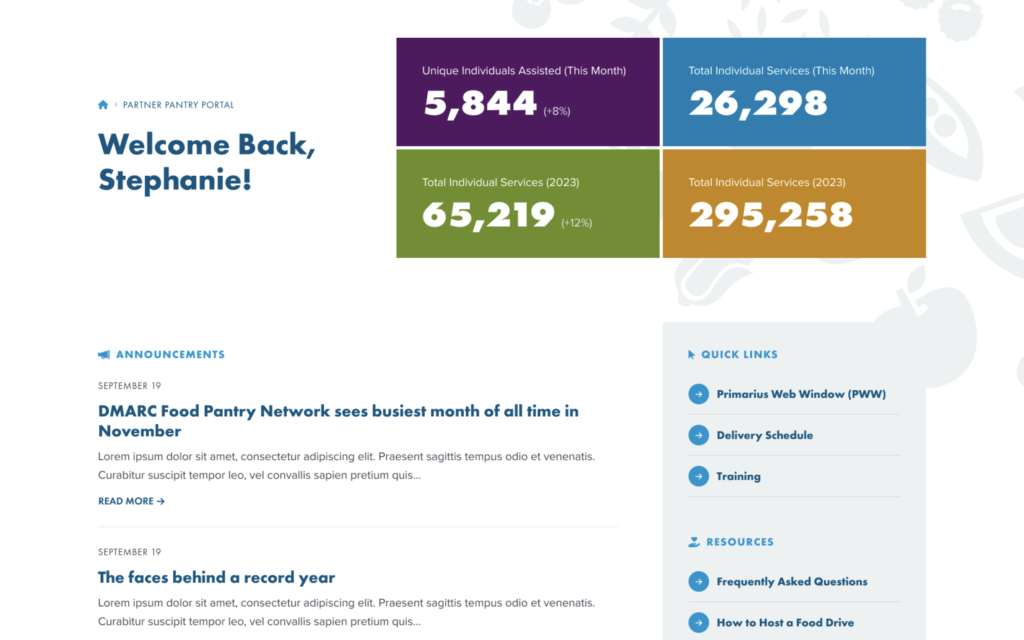
DMARC pantry portal.
Wayfinding matters more than click counts
Fewer clicks don’t automatically equal better experience. Clarity does. If users take three intuitive steps, that’s better than one confusing leap.
Great intranet wayfinding requires clear navigation labels, logical grouping, minimal jargon, and predictable structure. It should feel guided, not chaotic. Your intranet shouldn’t feel like an old shared drive. It should feel intentional.
Accessibility still applies
Remember, accessibility standards don’t stop at your login page. If your organization adheres to WCAG 2.2 AA guidelines (everyone should be doing that), your intranet should as well. Accessible forms, proper heading structure, sufficient color contrast, keyboard navigation support, and meaningful alternative text are essential.
Internal users deserve inclusive design just as much as public audiences do. Accessibility isn’t just compliance. It’s respect.
Measure what matters
Intranet best practices don’t stop at launch. Track:
- Most searched terms
- Failed searches
- Popular resources
- Underutilized content
- Workflow completion rates
Analytics reveal friction points and guide iterative improvements. An intranet should evolve alongside your organization.
Your intranet should be a daily experience
Your intranet isn’t a side project. It’s a daily experience for your team. And possibly your board. And possibly your partner network. If it’s chaotic, outdated, and confusing, that friction compounds quietly over timIf it’s intuitive, culture-driven, and thoughtfully structured, that benefit compounds too. A well-designed intranet reduces frustration. Encourages connection. Strengthens governance. Improves collaboration. Makes everyday work feel smoother.
And that’s worth investing in. If you’re ready to rethink your intranet — not just redesign it — we’d love to help you build something that’s strategic, flexible, and give it that special Juicebox touch!